We Use CookiesWe use cookies to enhance the security, performance, functionality and for analytical and promotional activities. By continuing to browse this site you are agreeing to our privacy policy

Top 10 Color Laser Printers Deals Right Now
#1Value for Money
Canon Colo
How do we rank products for you?

Our technology thoroughly searches through the online shopping world, reviewing hundreds of sites. We then process and analyze this information, updating in real-time to bring you the latest top-rated products. This way, you always get the best and most current options available.

headphones-stars

Our Top Picks

#1Value for Money

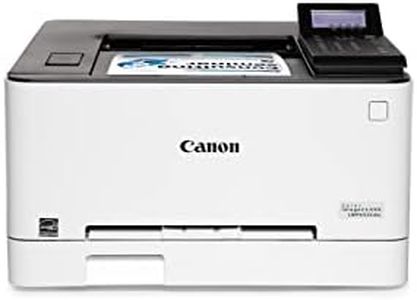
Canon Color imageCLASS MF751Cdw II - Wireless Duplex Laser Printer, Multifunction with Copier, Scanner, Automatic Document Feeder, 3 Year Limited Warranty, 35 PPM

Rating
10.0
Chosen by1,199
Connectivity Options
Print Speed (Pages Per Minute, PPM)
Duplex Printing (Automatic Double-Sided Printing)

Most important from
266 reviews

Connectivity Options
Setup is straightforward and the WiFi printing experience is seamless, allowing direct scanning to apps without cumbersome file transfers.
Print Speed (Pages Per Minute, PPM)
Prints start almost instantly and pages come out rapidly, making it one of the fastest printers in its class.
Duplex Printing (Automatic Double-Sided Printing)
The duplex printing feature is impressively fast and reliable, efficiently printing double-sided documents without jams or slowdowns.
Running Costs (Toner Efficiency and Maintenance)
Toner consumption is conservative, and high-capacity cartridges deliver long-lasting print runs, making running costs reasonable for a laser printer.
Size and Noise Level
The printer is heavy and requires dedicated space, but its robust build supports consistent, business-class performance over time.

The Canon Color imageCLASS MF751Cdw II is a solid choice for home offices or small businesses needing a reliable color laser printer with multifunction features. It delivers fast print speeds up to 35 pages per minute for both color and black-and-white, which helps reduce waiting time. Print resolution at 600 x 600 dpi ensures decent color quality suitable for everyday documents and presentations, though it may not match photo-quality printers. Wireless connectivity options like Wi-Fi, Ethernet, and USB allow flexible setup and easy mobile device printing through apps like Canon PRINT and Apple AirPrint.

Paper handling is convenient with a 250-sheet main tray, a 50-sheet multipurpose tray, and the ability to expand capacity further with an optional cassette. The automatic duplex printing is a valuable feature that saves paper and effort when printing double-sided documents. Running costs are kept reasonable with high-capacity Canon Genuine Toner cartridges designed for good page yields, but as with many laser printers, toner replacement can be a significant expense over time.

Physically, the printer is quite sizable and weighs 45 pounds, so it requires a dedicated space and may not be the quietest choice, though specific noise levels aren't detailed. The 5-inch color touchscreen provides easy access to scanning, copying, and printing tasks, plus a three-year limited warranty offers peace of mind. This printer suits users needing a dependable, multifunction color laser with solid speed, quality, and flexible connectivity, though it may not be ideal for heavy photo printing or very large volumes.

Rating
10.0
Chosen by1,199
Connectivity Options
Print Speed (Pages Per Minute, PPM)
Duplex Printing (Automatic Double-Sided Printing)

Most important from
266 reviews

Connectivity Options
Setup is straightforward and the WiFi printing experience is seamless, allowing direct scanning to apps without cumbersome file transfers.
Print Speed (Pages Per Minute, PPM)
Prints start almost instantly and pages come out rapidly, making it one of the fastest printers in its class.
Duplex Printing (Automatic Double-Sided Printing)
The duplex printing feature is impressively fast and reliable, efficiently printing double-sided documents without jams or slowdowns.
Running Costs (Toner Efficiency and Maintenance)
Toner consumption is conservative, and high-capacity cartridges deliver long-lasting print runs, making running costs reasonable for a laser printer.
Size and Noise Level
The printer is heavy and requires dedicated space, but its robust build supports consistent, business-class performance over time.
#2

Great Choice

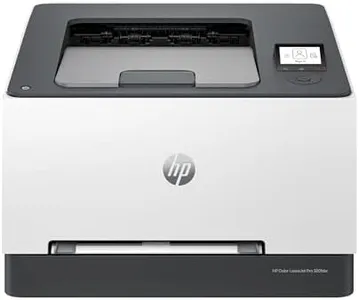
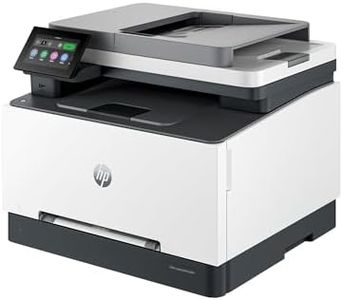
HP Color LaserJet Pro MFP 3301sdw Wireless All-in-One Color Laser Printer, Office Printer, Scanner, Copier, ADF, Duplex, Best-for-Office (499Q3F)

Rating
9.7
Print Speed
Print Quality
Duty Cycle

Most important from
701 reviews

Print Speed
It prints so fast and the quality of the copies are amazing, capturing every faded detail.
Print Quality
Print and color quality is superb and setup is easy.
Duty Cycle
The black ink cartridge that came with it is still going strong after a month, even with daily printing.
Connectivity Options
Connecting to wifi was painless, and the printer has a drawer feed with zero paper jams.
Paper Handling
Connecting to wifi was painless, and the printer has a drawer feed with zero paper jams.
Additional Features
Great print quality and great price, with the added convenience of a USB port to scan to a memory stick.

The HP Color Laserjet Pro MFP 3301sdw is designed for small teams looking for a reliable all-in-one color laser printer that excels in both print quality and speed. One of its standout features is the impressive print speed of up to 26 pages per minute for both black and color documents, making it suitable for busy office environments where time is of the essence. The printer utilizes advanced TerraJet toner, known for producing vibrant colors and sharp prints, which is beneficial for creating professional-quality documents and reports.

In terms of usability, it offers a range of connectivity options, including dual-band Wi-Fi, allowing for wireless printing from smartphones and computers, which enhances convenience. The auto 2-sided printing and a generous 250-sheet input tray further contribute to its productivity, reducing the need for frequent paper refills. The built-in security features provide peace of mind, especially in environments where data protection is crucial.

There are a few drawbacks to consider. At 37.7 pounds, this printer is relatively heavy, which may be a consideration if space is limited or if it needs to be moved frequently. The cost of consumables, particularly the HP toner cartridges, can add up over time, especially for high-volume printing. Additionally, while the printer is robust for office tasks, it may be more than what a casual user or a home office setup requires, potentially leading to underutilization.

Rating
9.7
Print Speed
Print Quality
Duty Cycle

Most important from
701 reviews

Print Speed
It prints so fast and the quality of the copies are amazing, capturing every faded detail.
Print Quality
Print and color quality is superb and setup is easy.
Duty Cycle
The black ink cartridge that came with it is still going strong after a month, even with daily printing.
Connectivity Options
Connecting to wifi was painless, and the printer has a drawer feed with zero paper jams.
Paper Handling
Connecting to wifi was painless, and the printer has a drawer feed with zero paper jams.
Additional Features
Great print quality and great price, with the added convenience of a USB port to scan to a memory stick.
#3

Epson EcoTank ET-4800 Wireless All-in-One Cartridge-Free Supertank Printer with Scanner, Copier, Fax, ADF and Ethernet – Ideal-for Your Home Office, White

Rating
9.4
Print Speed
Print Quality
Connectivity Options

Most important from
4815 reviews

Print Speed
While not the fastest printer, its reliability and cost savings make it a fantastic option for regular printing without constant cartridge swaps.
Print Quality
The print quality is crisp for documents and handles color prints well enough for everyday needs, making it a solid performer for home or small office use.
Connectivity Options
Despite the small LED display, using the app or computer to control the printer works seamlessly.
Paper Handling
The direct paper feed is convenient for handling heavier card stock, and the smaller footprint is a space saver.
Cost of Consumables
The Epson EcoTank ET-4800 is a breath of fresh air with its massive ink reservoir, eliminating the need for frustrating ink subscriptions and overpriced cartridges.
Additional Features
Setting up the printer is refreshingly simple, with mess-free ink tank filling and an easy-to-follow app-guided process.

The Epson EcoTank ET-4800 is a versatile all-in-one printer designed for home offices, offering printing, scanning, copying, and fax capabilities. A standout feature is its cartridge-free design with high-capacity ink tanks, significantly reducing the cost and frequency of ink replacements. This can lead to up to 90% savings on ink costs, with enough ink included to last up to two years. This printer also emphasizes environmental benefits by reducing cartridge waste. The print quality is impressive, thanks to Epson's Micro Piezo Heat-Free Technology, providing sharp text and vibrant color graphics on various paper types.

Connectivity options are modern and flexible, with both Ethernet and Wi-Fi available, as well as hands-free voice-activated printing and compatibility with the Epson Smart Panel App for easy mobile printing. However, the print speeds are relatively slow, with a maximum of 10 pages per minute (ppm) for monochrome and 5 ppm for color printing. Additionally, the paper handling capacity is moderate, with a 100-sheet output capacity, which may require frequent refilling for heavy users.

The cost of consumables is low in the long run, but the initial investment might be higher than traditional cartridge-based printers. This printer is ideal for home offices that prioritize cost-efficiency and environmental sustainability over high-speed printing.

Rating
9.4
Print Speed
Print Quality
Connectivity Options

Most important from
4815 reviews

Print Speed
While not the fastest printer, its reliability and cost savings make it a fantastic option for regular printing without constant cartridge swaps.
Print Quality
The print quality is crisp for documents and handles color prints well enough for everyday needs, making it a solid performer for home or small office use.
Connectivity Options
Despite the small LED display, using the app or computer to control the printer works seamlessly.
Paper Handling
The direct paper feed is convenient for handling heavier card stock, and the smaller footprint is a space saver.
Cost of Consumables
The Epson EcoTank ET-4800 is a breath of fresh air with its massive ink reservoir, eliminating the need for frustrating ink subscriptions and overpriced cartridges.
Additional Features
Setting up the printer is refreshingly simple, with mess-free ink tank filling and an easy-to-follow app-guided process.

Buying Guide for the Best Color Laser Printers

When you're looking to buy a color laser printer, focus first on what you mainly need to print—such as photos, documents, presentations, or labels. Think about how often you'll print, and whether you'll be printing in large batches. Also consider where the printer will be placed (home office, shared workspace, etc.), and who will use it. Knowing your typical print jobs and usage patterns will help you figure out which features really matter to you and make it easier to pick a printer that fits your needs best.
Print Speed (Pages Per Minute, PPM)Print speed tells you how many pages a printer can produce in one minute, usually split between black-and-white and color prints. This is important because if you have a high volume of printing or often need documents quickly, a faster print speed keeps you productive. Entry-level printers generally offer speeds around 15-20 PPM, which is fine for home or light office use. Mid-range printers may print between 20-35 PPM, great for moderate daily needs. High-speed models go above 35 PPM, ideal for busy offices or teams. To pick what you need, think about whether you'll be printing a few pages here and there, or need to turn around large sets of documents quickly.
Print Resolution (DPI)Print resolution, measured in DPI (dots per inch), tells you how sharp and detailed your prints will look. A higher DPI means crisper text and finer color detail, which is important if you print charts, graphics, or images. Basic models have a resolution around 600 x 600 DPI, suitable for plain text and simple graphics. Mid-level resolutions like 1200 x 1200 DPI give you better images and more professional documents. Very high resolutions (over 2400 DPI) are most useful if you need to present polished graphics or marketing materials. Choose according to your typical print content; for mostly text, lower DPI is fine, but for marketing material or colorful image-heavy prints, aim higher.
Connectivity OptionsConnectivity refers to how you connect the printer to your computer or network. Common options include USB, Wi-Fi, Ethernet, and sometimes Bluetooth or cloud printing. This is important for convenience—if you want to print wirelessly from multiple devices or enable printing from phones and tablets, wireless and network features matter more. Basic home printers might have USB only, while more flexible models support Wi-Fi or Ethernet for shared use. Cloud or mobile printing is useful in tech-savvy households and offices. Match the connectivity to your devices and how you intend to print; go for simple cables if printing from one computer, or wireless/network options for flexibility and shared access.
Paper Handling (Capacity and Supported Sizes)Paper handling covers how much paper the printer can hold (input tray capacity), and what sizes or types it supports (like envelopes, card stock). This matters if you print in high volumes or need special formats. Small/home printers hold 100-150 sheets, which is okay for light use, but offices might want a 250-sheet or larger tray to reduce refilling. Some printers handle multiple sizes or offer extra trays for specialized tasks. Consider your print frequency and whether you’ll regularly print on larger sizes or special media, and pick a printer with enough capacity and flexibility to avoid constant paper changes.
Duplex Printing (Automatic Double-Sided Printing)Duplex printing is the ability to print on both sides of a sheet automatically. It saves paper, costs, and time, especially for reports or multi-page documents. Not all printers offer this, and sometimes it’s manual. If you expect to produce lots of multi-page documents or want to save on paper, automatic duplexing is a convenience you’ll appreciate. If you only print single pages or don’t mind turning the paper yourself, it may not be necessary.
Running Costs (Toner Efficiency and Maintenance)Running costs involve how much you’ll spend over time on toner and replacement parts. Toner efficiency (pages per cartridge) tells you how often you'll need new cartridges, affecting your ongoing expenses and convenience. Printers with higher-capacity cartridges cost less per page, while low-capacity ones may require frequent replacements. Also, check if maintenance kits or replacement drums are needed. If you print a lot, higher-yield cartridges and easy maintenance will save hassle and money; if your usage is light, this may not be a top concern.
Size and Noise LevelSize and noise level can be important if you have a small workspace or share your environment. Some laser printers are quite bulky or loud, which can be bothersome in a quiet area. Smaller, quieter models are better for individual workspaces or homes, while larger ones are fine in dedicated print rooms or busy offices. Think about your available space, placement, and tolerance for noise before deciding.

FAQ